Tag: Godot

  • The Command Line Made Godot Click

    The Command Line Made Godot Click

    Completion date: July 17, 2026

    Project: GA Godot learning path

    Mini-project: MP2 Turn Counter and Resource Loop

    Technology: Godot 4.x, GDScript, UI controls, headless CLI testing

    Primary skill: Separating turn-based simulation from presentation

    Definition of done: Advancing five turns produces predictable resource totals and five readable event entries.

    A tiny turn-based resource loop showed that separating simulation from presentation, validating logic headlessly, and parking attractive extensions can make an unfamiliar visual engine feel like an understandable software system.

    Outline

    1. A familiar problem inside an unfamiliar engine
    2. The smallest complete turn loop
    3. The button that did nothing
    4. The command-line breakthrough
    5. Why the first test was deliberately predictable
    6. Preserving ideas without activating them
    7. What this changes for GA
    8. The next experiment

    MP2 Turn Counter and Resource Loop

    A turn counter is not complicated.

    Increment a number. Apply resource rules in the correct order. Refresh the output. Repeat.

    I have built variations of that logic in at least three other programming languages, so I expected this mini-project to be easy. The arithmetic was easy. The interesting part was discovering what that arithmetic meant inside Godot.

    Reading the GDScript showed me individual operations, but it did not immediately reveal the entire system. I still needed to understand where the objects existed, what owned them, how a scene acquired its behavior, and how a visible button became connected to simulation code.

    The project’s most useful result was not the resource counter itself. It was reaching the point where Godot stopped feeling like a mostly graphical editor and began feeling like an inspectable software environment.

    The command line made that transition possible.

    A Familiar Problem Inside an Unfamiliar Engine

    The underlying programming model was familiar:

    Input
    → Process
    → Output
    

    Processing order has mattered throughout my programming experience. Whether a system is updating a database, transforming a set of values, or resolving a game turn, each stage must happen in the intended sequence.

    The uncertainty was not the logic. It was the interconnection between the logic and Godot’s visual structure.

    Godot combines several layers:

    • scenes and nodes,
    • scripts attached to nodes,
    • signals connecting actions,
    • runtime state objects,
    • and visual controls that present the results.

    The code review was useful, but the code alone did not paint the full picture. A script could be perfectly readable while one missing relationship prevented the project from doing anything.

    That was the gap this mini-project exposed.

    The Smallest Complete Turn Loop

    The project was intentionally narrow.

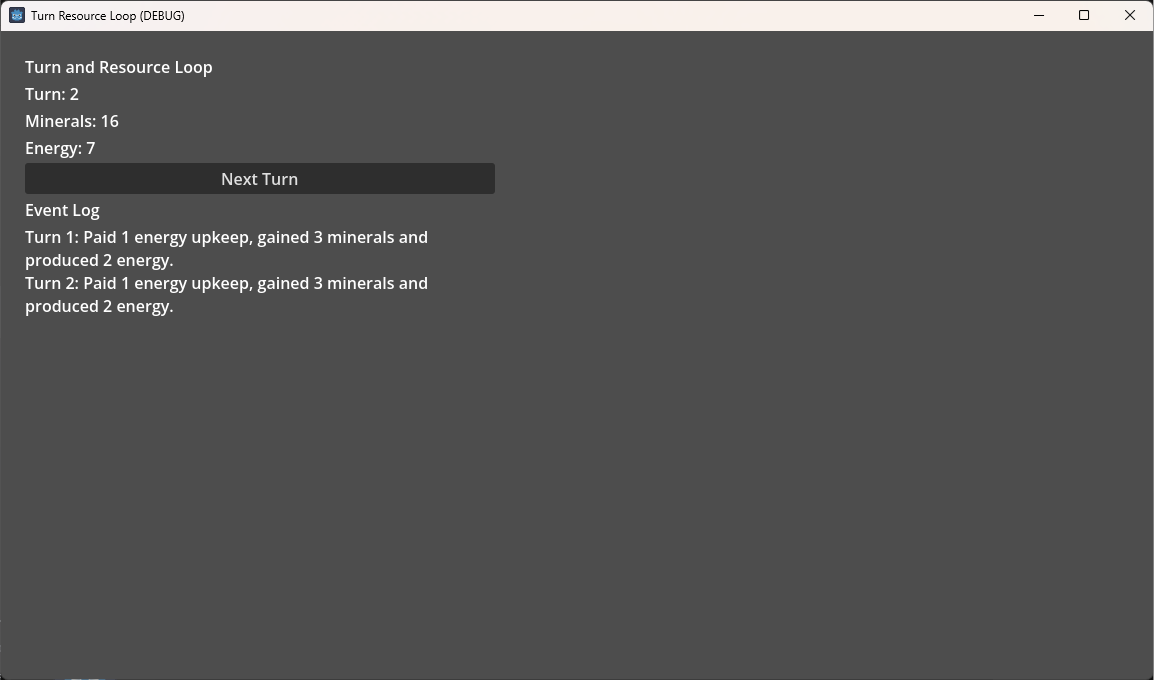
    The player could press a Next Turn button. Each turn changed two resources according to fixed rules, refreshed the interface, and wrote a readable entry to an event log.

    The implementation divided responsibility into three parts:

    • TurnState stored the turn number and resource totals.
    • TurnProcessor applied one complete turn in a consistent order.
    • Main handled the interface, requested the state change, and refreshed what the player saw.

    The resulting data flow was:

    Button press
    → TurnProcessor
    → TurnState changes
    → interface refresh
    → event-log entry
    

    The final turn sequence was also explicit:

    1. Advance the turn number.
    2. Pay energy upkeep.
    3. Add mineral production.
    4. Add energy production.
    5. Check for an energy-reserve bonus.
    6. Return a readable event message.

    The order itself was not a revelation. After decades of programming, ordered processing is nearly instinctive. Its purpose here was to create a small but genuine simulation pipeline that could be observed and tested.

    The project began with:

    Turn: 0
    Minerals: 10
    Energy: 5
    

    After five turns, the expected final state was:

    Turn: 5
    Minerals: 26
    Energy: 10
    

    The event log also had to contain five readable entries.

    That was enough complexity to demonstrate a turn system without allowing the experiment to become a small economic engine wearing an oversized admiral’s coat.

    The Button That Did Nothing

    When I reached the first full validation, clicking Next Turn did nothing.

    The scene existed. The interface existed. The state and processor scripts existed. The button existed. The code looked correct.

    The missing piece was that main.gd had not been attached to main.tscn.

    The scene looked assembled, but it had no script driving it.

    This was not a difficult bug. Once I began following the evidence, it took only minutes to locate. That quick diagnosis was encouraging because debugging is one of the best ways I know to understand a programming environment. A failure forces invisible assumptions into the open.

    The immediate lesson was simple:

    A script file does not become active merely because it exists in the project. It must be attached, instantiated, or loaded by something that is already running.

    The more useful lesson was about visual development environments.

    An editor can make a project appear complete before the relationships that make it function are actually connected. I had mentally joined the scene and script because I had created both. Godot had not joined them because I had not explicitly established that ownership.

    That distinction clarified the separation between the visual structure and the code responsible for its behavior.

    Returning to Visual Programming After Two Decades

    Godot is not my first environment that combines code and graphics.

    The last one in which I became deeply fluent was Macromedia Director, using Lingo. I built visual experiments including flocking behavior and ant simulations with pheromone-style heat maps. Director allowed code to influence graphical objects with relatively little resistance.

    At roughly the same stage of my career, I also tried to learn graphical programming through C++ and DirectX. That path never became as transparent to me. Director eventually reached the point where the editor and codebase disappeared behind the problem I was trying to solve.

    I have experienced a similar transparency with SQL and database tools. Once the textual language and the graphical environment become mentally unified, the interface stops feeling like an extra layer. It becomes another view into the same system.

    Godot has not reached that level of transparency for me yet.

    This project moved it closer.

    The visual interface helped the turn loop make sense because I could see the values change. The deeper breakthrough came when the same logic ran without the interface at all.

    The Command-Line Breakthrough

    The most important moment in the project was writing the command that ran the test script in Godot’s headless mode.

    The test created a fresh state object, created a turn processor, advanced five turns, compared the results with known expected values, printed clear pass-or-fail messages, and exited.

    It did not load the main scene.

    It did not click a button.

    It did not depend on labels, visual nodes, or mouse input.

    That CLI invocation felt familiar in the same way that a Bash script or a small php -r command feels familiar. It gave me a tool state I already understood.

    Godot was no longer only a graphical environment where scenes came alive through an editor. It was also a system that could be called, isolated, tested, and inspected from the command line.

    The test proved something stronger than the working interface:

    The simulation logic did not belong to the screen.

    The interface presented the state, but the state and its rules could exist without that interface.

    That single result made several future possibilities feel more achievable:

    • automated balance simulations,
    • fault testing,
    • AI-controlled test runs,
    • long-running economic experiments,
    • and autonomous headless servers hosting persistent worlds.

    This mini-project did not build any of those systems. It established the conceptual path toward them.

    That distinction matters. A learning project should make the next decision safer, not quietly become every future feature at once.

    Why the First Test Was Deliberately Predictable

    The headless test used fixed starting values and fixed expected totals.

    That may appear limited when the long-term interests include procedural generation, AI agents, and unpredictable player behavior. I am strongly interested in testing systems against the kind of chaos users can create.

    My production experience made that interest practical. In high-precision environments, an incomplete test can allow a mistake to survive until a fix misses an update cycle. That can lead to another round of diagnosis, correction, and verification.

    Still, randomness would have been the wrong first test here.

    The deterministic five-turn test answered one clear question:

    Given known starting conditions and known rules, does the turn processor produce the exact expected state?

    That is the foundation.

    Procedural tests can later explore a much larger behavior space. They might generate different producers, consumers, starting states, or simulated player decisions. Instead of checking one exact total, they could test broader invariants:

    • resources do not enter invalid states,
    • transactions remain balanced,
    • the same seed reproduces the same sequence,
    • and every turn completes without corrupting state.

    Those tests become useful after the fixed rules are trustworthy.

    Adding randomness too early would have added fog at the exact moment the project needed clarity.

    Preserving Ideas Without Activating Them

    Once the turn loop worked, several extension ideas arrived quickly.

    I considered adding simulation objects that consumed one resource and produced another. A farm, for example, might consume one mineral and produce two food.

    That led naturally to the idea of a collection of turn-processing objects. Each object might participate in a consumption phase and later in a production phase.

    I also considered:

    • procedural turn events,
    • randomized outputs,
    • tests that adapt their expectations to generated runs,
    • and broader simulations designed to approach user-created chaos.

    Each idea could support a useful future experiment.

    Adding them here would have changed the project from a focused learning exercise into the beginning of a general simulation framework.

    Instead, I recorded the ideas in the project parking lot.

    This was my first practical use of that holding space, and it solved a real creative problem. New systems generate adjacent ideas almost automatically. Preserving them is valuable, but preserving an idea does not require activating it immediately.

    The parking lot allowed me to say:

    This is worth remembering, but it is not part of the current definition of done.

    That distinction protected the project from becoming an asteroid field of half-built extensions.

    The correct stopping point remained:

    • a functioning interface,
    • separate state and processing objects,
    • an explicit turn order,
    • a readable event log,
    • a deterministic headless test,
    • and known expected results.

    The project had answered its question.

    What Changed in My Understanding

    The strongest lesson was not about resource arithmetic.

    It was about thinking through the full set of interconnections before becoming absorbed in individual files.

    For a visual system, the useful mental model is now:

    Input
    → ownership
    → processing
    → state mutation
    → presentation
    → verification
    

    The code remains important, but the program also includes the relationships surrounding the code:

    • which scene owns a script,
    • which object creates the state,
    • which signal requests a change,
    • which processor is allowed to mutate the state,
    • and which interface reads the result.

    The second lesson was that headless execution is not merely a deployment concern. It is a design, learning, and testing tool.

    Logic that can run from the CLI is easier to isolate. Each stage can produce clear pass-or-fail output. With some planning, unit tests can provide rapid detection of logic errors close to where they are introduced.

    The third lesson was about scope control.

    Creative energy produces possibilities. Finishing requires a trustworthy place to store those possibilities without mistaking them for current obligations.

    The Transferable Principle

    The reusable principle extends beyond Godot:

    Design the input, ownership, processing, output, and verification boundaries as one connected system.

    A visual interface should not be responsible for creating the truth it displays. It should request an action and present the resulting state.

    The simulation should remain understandable without its presentation layer.

    The test should be able to verify the simulation without pretending to be a user.

    That separation supports several practical benefits:

    • the UI can change without rewriting core rules,
    • simulation logic can run on a server,
    • tests can execute without rendering,
    • faults can be isolated more quickly,
    • and future systems can reuse the same state transitions through different interfaces.

    This mini-project was far too small to prove a production architecture. It was large enough to prove the value of the boundary.

    Why This Matters to GA

    The smallest useful pattern carried into GA is:

    Keep turn-processing logic independent from scenes, and validate each active stage through deterministic headless tests.

    That pattern may later support empire turns, colony production, AI behavior, balance simulations, regression tests, and server-side worlds.

    No public feature promise follows from this experiment. The important result is that these future systems now have a safer starting assumption:

    • simulation owns the state,
    • presentation displays the state,
    • and tests verify the state without requiring presentation.

    The mini-project code may remain a learning artifact rather than becoming production code directly. The mental model and testing approach are the reusable assets.

    What Remains Deliberately Unbuilt

    This project did not add:

    • collections of producers and consumers,
    • food or other resource chains,
    • procedural events,
    • randomized outcomes,
    • adaptive test expectations,
    • structured event objects,
    • a full testing framework,
    • or a persistent server.

    These ideas remain useful, but they belong to later experiments with clearer requirements.

    The deterministic test runner is Next as a recurring development pattern.

    Procedural simulation testing is Later.

    A general resource-processing framework and persistent headless world are Parked until GA actually requires them.

    Stopping here was not abandoning those ideas. It was preserving the conditions under which they can later be designed well.

    The Next Experiment

    The next mini-project moves from numerical state to spatial state: a simple hex-grid builder.

    Instead of proving that turn totals can remain separate from their display, the next experiment must prove that tile coordinates, occupancy, selection, and rendering can remain understandable as separate responsibilities.

    The central lesson should transfer cleanly:

    Build the smallest useful system. Think through the interconnections. Keep the underlying data independent from the visual representation. Verify behavior with known results.

    Store the other ideas safely.

    Then move forward.


    What I Learned

    • A visual project can look assembled before its runtime relationships are connected.
    • Simulation logic becomes easier to understand when it can run without the UI.
    • Deterministic tests should establish known behavior before randomized tests explore broader behavior.
    • Scene ownership, script attachment, signals, and object creation are part of the program, not editor housekeeping.
    • A parking lot protects creative ideas without allowing them to rewrite the active scope.

    Larger Project Impact

    GA carries forward one immediate implementation principle: turn-processing logic should remain independent from scene presentation and should be runnable through deterministic headless tests.

    This does not establish a finished server architecture or production testing framework. It establishes a reliable direction. As future simulation systems become active, each should expose enough headless behavior to produce clear pass-or-fail evidence without requiring the graphical client.

    The project also confirmed a scope-management practice: extensions can be preserved in the parking lot until their scale, player value, and system boundaries are better understood.
  • The Hard Part Wasn’t the Code: Learning How Godot Owns a Game

    The Hard Part Wasn’t the Code: Learning How Godot Owns a Game

    Article type: Learning Retrospective with a technical case-study core
    Completion date: July 16, 2026
    Project: GA Godot learning path
    Audience: General readers, developers, future collaborators, and my future self

    This project explored what changes when a simple Godot exercise becomes a complete, testable game loop, and showed that the most valuable lesson was not GDScript syntax but understanding how scenes, scripts, nodes, and spawned instances divide responsibility.

    Outline

    1. Why another introductory project was still worthwhile
    2. The deliberately tiny game loop
    3. Why the code itself was not the main challenge
    4. The difference between a scene, a script, a container, and an instance
    5. The mistake that exposed the real architecture
    6. How reading AI-generated code changed the learning process
    7. What save and load added to the experiment
    8. Evidence that the project was complete
    9. The reusable lesson
    10. What this changes for the larger game
    11. What remains deliberately unbuilt
    12. The next experiment

    MP1 Space Miner Clicker

    After nearly forty years of working with roughly a dozen programming languages, I expected a tiny introductory Godot project to be almost frictionless.

    For the most part, it was.

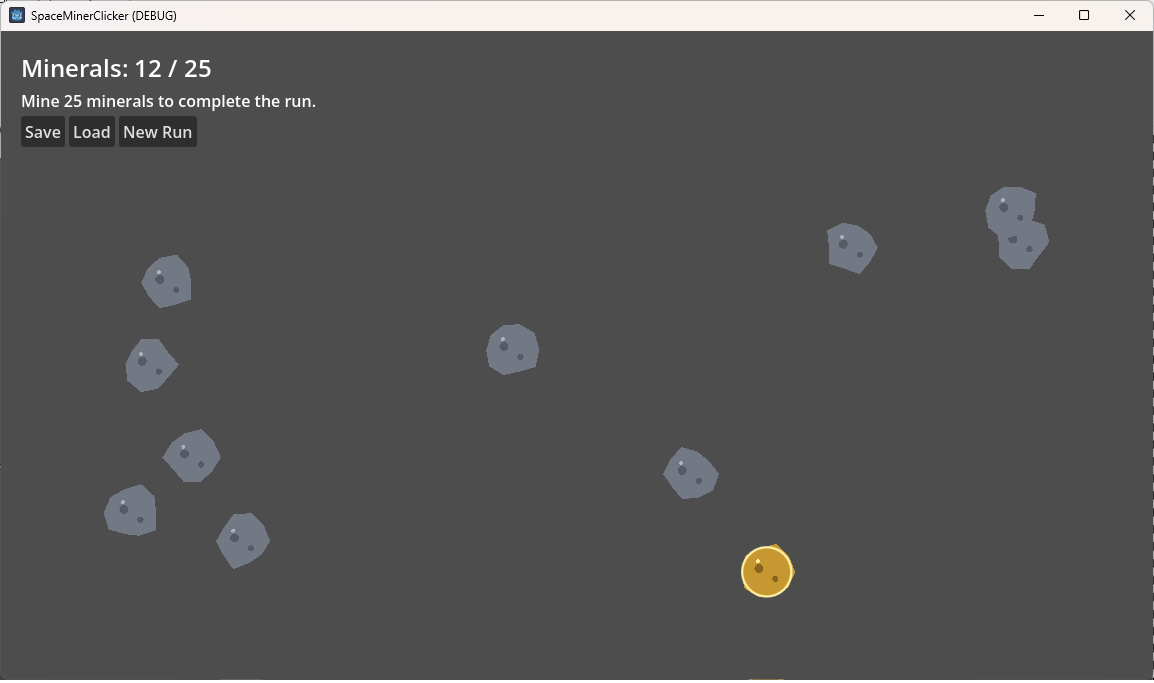
    The project was called Space Miner Clicker. Asteroids appeared on the screen. Clicking one collected minerals. A counter displayed the total. A rare gold asteroid was worth more than an ordinary one. The player could save the mineral total, start a new run, and load the earlier state.

    None of that required a particularly difficult algorithm.

    The difficult part was understanding who owned what.

    That distinction matters because Godot is not just a programming language with a graphics library attached. It is an engine built around scenes, nodes, scripts, resources, editor assignments, and runtime instances. The code becomes understandable only when those pieces are understood together.

    The project therefore became less about learning how to increment a number and more about learning how Godot thinks.

    Why Build Another Introductory Project?

    I have completed many introductory programming and Godot courses over the years. That creates an odd problem.

    Beginner material can feel familiar enough that it is tempting to move quickly through it. Variables, functions, conditionals, and loops are not new ideas. I do not need another extended explanation of what a variable is.

    At the same time, familiarity with programming does not automatically create fluency with a particular engine.

    I could read the GDScript without much trouble. What I did not yet have was an instinctive understanding of Godot’s ownership model.

    The mini-project existed to close that gap.

    The goal was deliberately modest:

    • spawn asteroids,
    • click them,
    • increase a mineral total,
    • display the result,
    • save the total,
    • and restore it later.

    The original definition of done was simple: asteroids had to spawn, clicking them had to increase the mineral count, and the count had to survive save and load.

    That narrow scope was important. It left very little room to hide confusion behind a larger feature set.

    The Smallest Useful Game Loop

    The finished project has two primary scenes.

    The first is the main scene. It owns the overall activity:

    • the mineral total,
    • the spawn timer,
    • the user interface,
    • the completion condition,
    • and the save/load operations.

    The second is the asteroid scene. It represents one asteroid:

    • its appearance,
    • its collision area,
    • its mineral value,
    • and its response to being clicked.

    The main scene creates asteroid instances and places them beneath an Asteroids node. That node is essentially an organizational parent for all currently active asteroids.

    The important relationship looks like this:

    Main scene
    ├── Main controller script
    ├── UI
    ├── Spawn timer
    └── Asteroids container
        ├── Asteroid instance
        ├── Asteroid instance
        └── Asteroid instance
    

    Each asteroid instance comes from the asteroid scene, and each asteroid scene uses the asteroid script.

    That explanation now feels straightforward.

    It did not feel straightforward while the project was broken.

    The Mistake That Revealed the Architecture

    My central mistake was assigning the asteroid script to the Asteroids container node.

    My reasoning was understandable but incorrect.

    The Asteroids node held the asteroid objects, so I assumed it needed to know about the asteroid script. In a more traditional application, I might create a collection whose type explicitly states what it contains. I carried some of that expectation into Godot.

    But the container was not an asteroid.

    It was simply a parent node that organized asteroid instances in the scene tree.

    The actual asteroid script belonged on the root node of asteroid.tscn, which represented one asteroid. The main scene did not need the asteroid script attached to its container. Instead, the main controller exposed an Asteroid Scene property in the Inspector. That property needed to reference asteroid.tscn.

    The main script could then instantiate that scene whenever a new asteroid was needed.

    In simplified form:

    @export var asteroid_scene: PackedScene
    
    var asteroid_node: Node = asteroid_scene.instantiate()
    var asteroid: Asteroid = asteroid_node as Asteroid
    

    The exported variable appeared in the Godot Inspector. Assigning asteroid.tscn to that field gave the main scene a template from which it could create asteroid instances.

    I had confused three separate relationships:

    1. A script attached to a node.
    2. A scene assigned as data through the Inspector.
    3. A runtime instance created from that scene.

    That confusion produced several symptoms.

    At different points, Godot reported type mismatches between Node2D and Area2D, missing signals, and invalid access to the asteroid’s mined signal. The individual errors looked unrelated until the scene ownership problem became clear.

    Once the correct responsibilities were restored, the errors stopped behaving like a cloud of unrelated failures. They became evidence of one architectural mistake.

    The diagnosis took roughly forty-five minutes.

    That was probably the most valuable forty-five minutes in the project.

    A Better Mental Model

    The model I carried away is this:

    • A scene is a reusable structure or template.
    • A script gives behavior to a particular node type.
    • A node occupies a place in the scene tree.
    • A container node may organize other nodes without becoming the same type as its children.
    • An instance is a runtime copy created from a scene.
    • An exported property allows a dependency or configuration value to be assigned through the Inspector.

    For this project, the main scene acts like a small factory.

    It knows which asteroid scene to use. It creates asteroid instances. It places them under the Asteroids parent. It listens for each asteroid’s mined signal. It updates the mineral total when that signal arrives.

    The asteroid itself does not need to understand the user interface, the completion target, or the save file. It only needs to know that it was clicked and how many minerals it is worth.

    That separation is small, but it is the beginning of real engine architecture.

    Learning With AI Without Surrendering Understanding

    Another difficulty came from the way I initially used ChatGPT.

    The early responses often delivered a large block of code followed by instructions to paste it into the project. That was efficient in one sense, but frustrating in another. I was not trying to avoid typing. I was trying to understand Godot.

    Copying finished code can produce a running project without producing a reliable mental model.

    I changed the process.

    Before reading the explanation beneath a code block, I began reading the GDScript itself and predicting what it did. Only after forming my own interpretation did I compare it with the explanation.

    That made the AI output more useful.

    Instead of treating the code as an answer, I treated it as something closer to a code review exercise. I could use decades of programming experience while focusing attention on the unfamiliar parts: scene paths, signals, exported properties, engine callbacks, node inheritance, and editor behavior.

    That approach respected the fact that I was new to Godot without pretending that I was new to programming.

    It also exposed errors more quickly. When the asteroid script suddenly contained save/load code, UI references, and spawn logic, the responsibilities no longer made sense. Reading the code as architecture rather than as instructions made the incoherence visible.

    Save and Load as a State-Boundary Exercise

    Save and load was not the most unfamiliar part of the project. Persistence is usually one of the first things I explore in a new language or platform.

    What mattered here was deciding what actually needed to be saved.

    The project stored:

    {
        "version": 1,
        "minerals": 14
    }
    

    It did not store the locations of every asteroid, the spawn timer’s exact progress, or whether each current asteroid was gold.

    Those values were temporary.

    The authoritative state was the mineral total. The completion state could be recalculated by comparing that total with the goal.

    The save operation followed a simple pipeline:

    Runtime state
    → Dictionary
    → JSON text
    → Save file
    

    Loading reversed the process:

    Save file
    → JSON text
    → Validated dictionary
    → Runtime state
    

    The project also included a save-version field. That was not necessary for such a tiny prototype, but it established an important habit: persistent data needs a format that can be identified and validated.

    The result remained intentionally small. This was not an attempt to build the final save system for a 4X strategy game.

    It was a controlled experiment in identifying state boundaries.

    Adding a Rare Reward and a Finish Line

    Once the base loop worked, I added one small variation.

    Most asteroids were gray and worth one mineral. A gold-colored asteroid had a 2.5 percent chance to spawn and was worth five minerals.

    The change added a little anticipation without requiring a new subsystem.

    The spawn logic simply made a weighted decision before configuring each asteroid instance. The same asteroid scene could represent both variants by changing its color and mineral value.

    The project also gained a completion condition at twenty-five minerals.

    This mattered because an endless counter is technically interactive but does not form a complete activity. A finish condition gave the loop a beginning, a measurable objective, and an end.

    When the total reached or exceeded the goal:

    • spawning stopped,
    • the remaining asteroids were cleared,
    • and the interface displayed a completion message.

    A New Run button reset the activity.

    The gold asteroid also created an edge case. If the player had twenty-three minerals and clicked a gold asteroid, the total jumped to twenty-eight. The completion check therefore needed to use “greater than or equal to,” not exact equality.

    That was a small test, but it demonstrated that completion behavior had been considered rather than merely observed once.

    Evidence of Completion

    The finished prototype demonstrated all of its intended behaviors:

    • asteroids spawned on a timer,
    • clicking a normal asteroid added one mineral,
    • clicking a gold asteroid added five,
    • the gold variant appeared through a configurable random chance,
    • the game completed at or above the target,
    • saving preserved the mineral total,
    • starting a new run reset the current state,
    • loading restored the saved total,
    • and the saved total survived closing and reopening the project.

    The strongest visual for the article would be a mid-game screenshot showing several asteroids, including one gold asteroid, with a recognizable total such as fourteen minerals.

    That image would communicate almost the whole project at a glance.

    The save/load behavior is better demonstrated through a short sequence:

    1. Save at fourteen minerals.
    2. Start a new run and return to zero.
    3. Load the save and restore fourteen.

    The project met its original definition of done and also added a modest completion condition and reward variation without escaping its learning-project boundaries.

    What Changed in My Understanding

    The most important change was not that I learned how to click an Area2D or write JSON.

    I learned to ask better architectural questions inside Godot:

    • Which node owns this behavior?
    • Which script belongs to that node?
    • Is this reference a script dependency, a scene dependency, or a runtime instance?
    • Is this node an object with behavior, or merely a parent organizing other objects?
    • Is a value assigned in code, inherited from a scene, or exposed through the Inspector?

    Those questions are more useful than memorizing the steps for building one asteroid game.

    They also provide a method for diagnosing errors. A type mismatch may not be a local syntax problem. It may reveal that a script has been attached to the wrong level of the scene tree.

    A missing signal may not mean the signal declaration is wrong. It may mean the runtime object is not the scene or script you think it is.

    That is a transferable debugging principle:

    When framework errors appear unrelated, inspect the ownership and object-creation model before treating each symptom as an isolated bug.

    Why This Matters to the Larger Project

    Space Miner Clicker is not production code for GA.

    It is a learning artifact.

    The larger game will eventually contain many systems with similar ownership questions:

    • galaxy views containing star-system instances,
    • star systems containing planets,
    • planets containing colony maps,
    • colony maps containing tiles and structures,
    • controllers spawning or loading scenes,
    • UI nodes observing state without owning the simulation,
    • and saved data recreating runtime objects.

    The asteroid mistake was therefore inexpensive and timely.

    It exposed a misunderstanding while the scene tree contained only a handful of nodes. The same misunderstanding inside a galaxy generator, colony interface, or multi-view GameState system would have been much more expensive.

    The smallest useful hook to carry forward is not the asteroid code itself.

    It is the ownership model:

    • controllers own orchestration,
    • reusable scenes define instance structure,
    • scripts belong to the node type they control,
    • container nodes organize instances without becoming those instances,
    • and Inspector-assigned scene references make dependencies visible.

    That model will be tested again in later mini-projects.

    What Remains Deliberately Unbuilt

    The project generated several tempting ideas.

    A mining upgrade could collect nearby asteroids in a chain. Another could affect a cone or directional area. Resources could purchase greater range, target count, or collection efficiency.

    Those ideas have player value, but they do not belong in this project.

    Adding them would require target selection, area queries, upgrade data, balancing, and visual feedback. At that point, the learning project would begin mutating into a small commercial clicker game.

    The correct stopping point was reached when the intended Godot concepts had been demonstrated and the save/load loop worked.

    The extra mining ideas are preserved as parked experiments, not implied commitments.

    The Next Experiment

    The next learning project moves from real-time spawning to turn-based state.

    Instead of clicking asteroids, the player advances turns. Each turn applies predictable resource changes and records what happened.

    That project will introduce a different architectural question:

    How should simulation state change when the user interface is only requesting an action rather than owning the rules?

    Space Miner Clicker did not answer that question.

    It did something more foundational.

    It gave me a working mental model for where Godot objects come from, who controls them, and how to recognize when a scene tree is telling a different story than the code.

    For a tiny asteroid game, that is a substantial payload.


    What I Learned

    • Programming experience does not replace engine-specific architectural fluency.
    • A scene reference, a script assignment, and a runtime instance are three different relationships.
    • Container nodes organize child objects without needing to inherit or attach the children’s behavior.
    • Reading AI-generated code before reading its explanation creates a better learning loop than copying it blindly.
    • When several engine errors appear at once, checking ownership and type relationships may reveal one shared cause.

    Larger Project Impact

    This mini-project confirmed that GA should keep orchestration, reusable scene definitions, runtime instances, and persistent state clearly separated.

    The asteroid implementation itself should remain a learning artifact. The reusable lesson is the ownership pattern:

    Controller
    → references a reusable scene
    → creates runtime instances
    → organizes them beneath a parent node
    → receives signals from those instances
    → updates authoritative state
    

    This pattern will inform later galaxy, star-system, planet, colony, and UI work.